
|
|
| |
In the latest releases of
Mac OS X, version 10.8 Mountain Lion, 10.9 Mavericks, 10.10 Yosemite and
10.11 El Capitan, Apple has added a security
feature called Gatekeeper.
Gatekeeper is intended to protect your Mac from malware by
blocking the launching of applications from unknown
sources. Gatekeeper works on any application that has
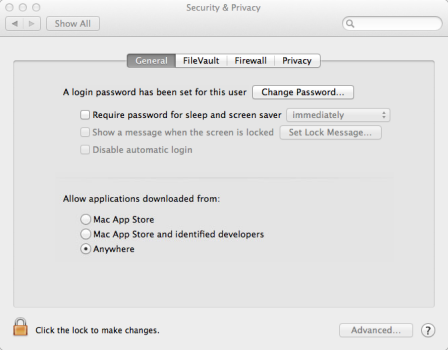
been downloaded from the Internet. Gatekeeper has three levels of security, which you choose in the Security and Privacy section of System Preferences: The top level only allows applications downloaded from the Mac App store. The middle level allows Mac App Store and applications from identified developers. The lowest level allows you to launch apps from anywhere. Obviously this is less secure, although it represents the same level of security that you had on OS X 10.7 Lion. Fiberworks is in the process of obtaining an Apple Developer Identity, which will satisfy the middle security level of Gatekeeper. However the current versions available on the website do not include an Apple Identity, and so will be blocked from launching on OS X 10.8 Mountain Lion, 10.9 Mavericks or 10.10 Yosemite In order to open and install the Fiberworks download files FiberworksSilver115.dmg or FiberworksBronze107.dmg, you need to temporarily set Gatekeeper to its lowest level. Download Silver or Bronze from our website. The file FiberworksSilver115.dmg or FiberworksBronze107.dmg can then be found in your Downloads folder, but can't be opened until you do the following:
Bronze contains Bronze.app, Bronze Manual.pdf, ReadMeFirst1.pdf and a folder of samples called My Weaving. The ReadMeFirst file contains installation instructions.
|
|
If you have any questions or comments
about this site go to Contact
Us |
 on
your Mac, choose
on
your Mac, choose