|
|
|
Step 1 |
Click on the download of your choice. (This image is just an example, not a live link!) |
|
Step 2 |
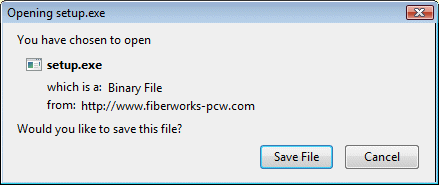
The different downloads may have different names to
distinguish versions, e.g. Br4216setup.exe and
Silver4236setup.exe. Click on Save File. Windows will then ask you where to save (see next panel). These illustrations are taken from Windows Vista. Other Windows versions may have slightly different framing, but the content of the panels should be similar. |
|
Step 3 |
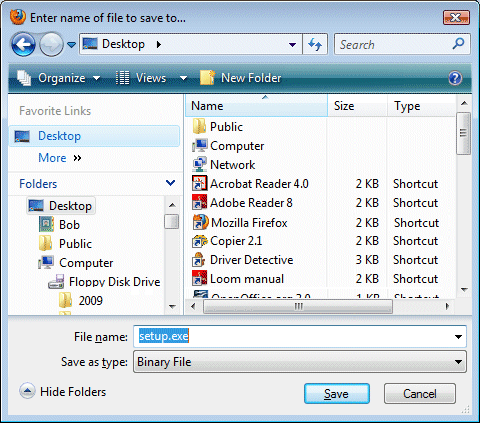
If you have a designated folder for downloads, you may select it now. Otherwise it can be convenient to Save to the Desktop.
|
|
Step 4 |
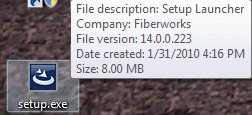
The icon will appear somewhere on your desktop. If you rest the mouse cursor on the icon without clicking, the box of text identifying the file contents will appear. Downloads should be 6-10 MB. Note the file size posted below each download link. If the size is smaller, your download failed to complete and you need to try again. |
|
Done! |
You are ready to install! |
|
[Home] [What's New] [Product] [Download] [FAQs] [Gallery] [Teaching] [Contact Us] [Site Index] |
|
If you have any questions or comments
about this site go to Contact
Us |