
|
|
Fiberworks 2 upgrade pricing
|
||||
| Download
first |
No payment, password or access code is
required to download. |
|||
| Install |
Open the downloaded
Fiberworks202Files.dmg file. Follow the complete installation
instructions. |
|||
| Run the program |
Ignore the validation request in
order to try the program out without payment. However you
can't Save files, Weave or Print until you purchase and
validate. There is no time limit for use in trial mode. |
|||
| Price |
Silver 2.0.2 from Silver 1.4 Bronze 2.0.2 from Bronze 1.4 Silver 2.0.2 from Bronze 1.4 Sales taxes apply for Canadian residents. To qualify for upgrade price, you must have an existing Fiberworks license. |
C$60 C$40 C$90 |
US$48 US$32 US$72 |
|
| |
||||
| Add Mac Bronze to existing Windows Bronze Add Mac Silver to existing Windows Silver Add Mac Silver to existing Windows Bronze |
C$40 C$60 C$90 |
US$32 US$48 US$72 |
||
| Transfer license to another user Original licensee must relinquish rights to Fiberworks |
C$30 |
US$24 |
||
program on USB stick instead of download postage extra, see below for rates |
add C$5 |
add US$4 |
||
| PDF manuals |
pdf manuals are included with download or USB. | |||
| Optional Printed Manuals |
Silver manual (78 pages, color) Bronze manual (70 pages, color). postage extra, see below for rates |
C$35 C$25 |
US$28 US$20 |
|
| Postage rates add to orders for DVD, USB or printed manual |
one DVD or USB only to Canada one manual only to Canada two manuals or or one manual plus DVD or USB to Canada |
C$3 C$6 C$7 |
||
| one DVD or USB only to USA one manual only to USA two manuals or or one manual plus DVD or USB to USA |
C$9 C$12 C$14 |
US$7 US$10 US$12 |
||
| one DVD or USB only, international airmail one manual only, international airmail two manuals or or one manual plus DVD or USB, international airmail |
C$12 A$13 C$24 A$27 C$30 A$34 |
£7.50 8 € £14 16 € £15 17 € |
||
| one DVD or USB only, international surface
mail one manual only, international surface mail two manuals or or one manual plus DVD or USB, international surface mail surface mail takes 4-12 weeks |
C$10 A$11 C$18 A$20 C$18 A$20 |
£6 7€ £10 11€ £10 11€ |
||
| Purchase
Silver Acheter Silver These links redirect you to Séguin Looms for payment |
Please let us know the following: Program ID number if you have already installed. Silver, Silver Plus - for which loom? download, DVD or USB stick? For Mac or Windows? pdf manual or printed copy? Location? - province if in Canada, country if elsewhere. |
|||
| Tax rates for Canadian residents | BC (5% GST + 7%BC Tax) AB SK MB YT NT NU (GST) ON (HST) QC (GST + QST) NB NF NS PEI (HST) |
12% 5% 13% 5%+9.975% 15% |
||
| See also |
upgrades,
Windows Bronze, Mac Bronze, Windows Silver/SilverPlus, Older Macs |
|||
ValidationThis panel appears when you first start the unvalidated Fiberworks Application.Each computer makes its own program ID and requires a separate validation code. To try out the program before purchasing, simply close the panel without entering a validation code. File Save, Save As, Weave and Print functions are unavailable until the validation has been entered. If you no longer see the validation panel, go to the Fiberworks menu and choose Quit Fiberworks. Re-launch Fiberworks and the panel will pop up once more. |
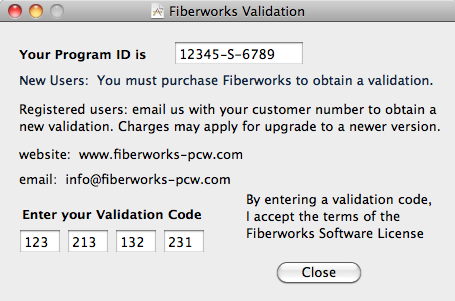 This is just an example, not your ID
and validation code!
|
|
If you have any questions or comments
about this site go to Contact
Us |